
Convert ecobee to Nest
Before/After photo of a successful conversion.
A little while back, we decided to switch out our old Ecobee thermostat for a fancier Nest one. We were pumped about the upgrade, but it ended up being way trickier than we thought. It took a sharp eye and steady hands to get it right. We had to make sure every wire went exactly where it belonged on the new setup. Getting the wiring to match the Nest’s layout was no joke - it had to be spot-on for everything to work smoothly.
We’ve got a picture showing the before-and-after of the wires we switched around. This one’s from the basement, where the thermostat sits near the furnace and all its wiring. The "before" part shows how things looked with the Ecobee hooked up. The "after" part shows the new setup for the Nest. This was just the basement setup, but it’s pretty similar to what we dealt with at other Ecobee spots in the house. Each place had its own little quirks, but the main hassle of sorting out the wires was the same everywhere.

Thermostat Letters Fun Facts
The letters on a Nest Thermostat (like Y, C, W, G, R, and OB) refer to the terminals where you connect the wires from your heating and cooling system. Each one has a specific role in controlling your HVAC setup. Here's what they typically mean:
- Y: This is for the cooling system, specifically the compressor in your air conditioner or heat pump. When the thermostat calls for cool air, it sends a signal through the Y wire to turn on the cooling equipment.
- C: Known as the "common" wire, this provides a continuous 24-volt power supply to the thermostat. It's not always required, but it helps keep the thermostat powered, especially for smart features like Wi-Fi.
- W: This controls the heating system. When heat is needed, the W wire signals the furnace or other heating equipment to kick on.
- G: This operates the fan or blower. The G wire tells the fan to run, either automatically with heating/cooling or manually if you just want air circulation.
- R: This is the power wire, delivering 24 volts from your system's transformer to the thermostat. Depending on your setup, it might be split into Rh (for heating) and Rc (for cooling), but on many Nest models, there's just one R terminal that handles both.
- OB: This terminal (often written as O/B) is typically for heat pump systems. It controls the reversing valve, which switches the heat pump between heating and cooling modes. The Nest setup will ask whether it's an "O" (energized for cooling) or "B" (energized for heating) based on your system.
These meanings can vary slightly depending on your specific HVAC system (like whether you have a conventional furnace, heat pump, or dual-stage setup), so the Nest app or manual guides you to wire them correctly during installation. If you're unsure about your system, it's worth double-checking how the wires were connected on your old thermostat or consulting your HVAC manual!
PermalinkWhy Patience Pays Off at Target During the Holiday Rush
Interesting Observation at a Local Target Store

This past weekend, I experienced something many of us have faced during the holiday season: long lines at the checkout. While at my local Target, I found myself waiting near the registers, observing the hustle and bustle of holiday shoppers. The store had only two regular registers open, along with one section of self-checkout. Unsurprisingly, the lines were long, and the air was thick with mild frustration.
However, something remarkable happened just a few minutes later. Target's team sprang into action. Two more regular registers opened, and the second set of self-checkout kiosks became available. Within moments, the lines thinned out, and the checkout process moved much faster. What initially felt like an endless wait turned out to be just a brief moment of holiday chaos.
The Takeaway? Patience Is Key
If you ever find yourself in a similar situation, especially during the busy holiday season, here's a tip: wait it out for a few minutes. Retail teams are well aware of the ebb and flow of holiday traffic, and they're likely working behind the scenes to open additional registers or self-checkouts as soon as they can. A little patience can turn what feels like a frustrating delay into a smoother, quicker experience.
Why This Happens
Retailers like Target use predictive scheduling to balance staff coverage, but it's not a perfect science. Spikes in customer traffic can happen unexpectedly, and it takes a few minutes to redirect employees or activate extra checkout options. Rather than getting frustrated, trust that the staff is working to resolve the issue as quickly as possible.
Tips for Surviving Holiday Shopping Lines
- Shop Off-Peak Hours: If possible, aim for early mornings or late evenings when stores are less crowded. Sunday mornings may seem like a good time, but everyone else has the same idea.
- Stay Calm: A long line is temporary. Take a deep breath, and remember that it's the season of goodwill.
- Walk Away: Walk away for a few minutes - the store may open more registers and you'll have a better checkout experience.
So next time you're at Target or another busy retailer, remember this: a little patience goes a long way. You might even find yourself leaving the store with a smile instead of a sigh.
PermalinkDiscover the Six Types of People You'll Meet as Santa Claus
From excited kids to skeptical teens, explore the heartwarming and hilarious encounters that make playing Santa a magical experience year after year.

This past weekend, I had the pleasure of donning the red suit and playing Santa at a local church. It's a role I've embraced for four years now, and I try to make it as entertaining and engaging as possible.
Each year brings a mix of emotions and reactions, and over time, I've come to recognize six distinct types of people who visit Santa. Here's a little insight into the festive fun:
1. Infants: Their First Christmas Photo
The tiniest visitors are often oblivious to the moment, but their parents are overjoyed to capture their first Christmas photo. Infants typically stare wide-eyed at the strange bearded figure holding them - or sometimes they burst into tears. Either way, these moments are precious milestones for families and make for adorable memories. We work hard to get the best picture as possible.
2. Toddlers: Terrified by Santa
For toddlers, Santa is an enigma. They're just old enough to notice something unusual about the jolly man in red, but not quite old enough to understand. The result? Fear. Lots of it. Some brave souls muster a hesitant smile, but most are a mix of screaming, squirming, and clinging to their parents for dear life. Many don't make it near me to get a high-five.
3. Elementary Kids: Excited to See Santa
This is the sweet spot. Elementary-aged kids are thrilled to see Santa, their faces lighting up with pure joy. They come prepared with wish lists, stories about being good all year, and big dreams about the presents they hope to find under the tree. These interactions are the highlight of my day. I laugh at some of the crazy requests.
4. Middle School Kids: The Skeptics
Middle schoolers start asking the tough questions: Are you really Santa? How do you visit all those houses in one night? They're testing the waters of skepticism but still secretly want to believe. It's fun to play along and offer clever, magical answers to keep their imaginations alive for just a little longer.
5. Teenagers: Reluctantly Along for the Ride
Teenagers are there because their family insisted. They roll their eyes, take the obligatory photo, and look forward to the moment they can escape. I always try to crack a joke or two to lighten the mood - sometimes it works, and sometimes it doesn't, but it's worth the effort.
6. Adults: The Support Crew
Adults are the proud parents and grandparents, soaking in the magic of the moment. They're there to capture the perfect photo and revel in their children's or grandchildren's joy. Some even whisper their thanks for bringing holiday cheer year after year. It's a touching reminder of the impact Santa can have, no matter the age. They do appreciate the effort that we put into the activity.
One of the best parts of being Santa for four years is seeing the same kids return year after year. Watching them grow up and knowing they recognize and appreciate seeing the same Santa is heartwarming. It's a testament to the joy and consistency this simple role brings to families during the holiday season.
Playing Santa is more than just putting on a suit - it's about spreading joy, sparking wonder, and connecting with people of all ages. Whether it's calming a frightened toddler, sharing a laugh with a skeptic, or simply listening to a little one's Christmas wishes, every interaction adds a little more magic to the season.
PermalinkZiggy School Tools Book
Cool Book that came out in the 1970s
Ziggy School Tools is a classic book that has been helping students learn and create for over 40 years. First published in 1976, Ziggy School Tools is a comprehensive reference book that contains all the tools you need for school, including alphabets, circles, hexagons, angles, rectangles, symbols, French curves, protractors, ovals, and a metric table.
The book is divided into two sections: the first section contains a variety of stencils that can be used for drawing and tracing, while the second section contains a variety of charts and tables that can be used for math and science.
Ziggy School Tools is a great resource for students of all ages. It is perfect for use in the classroom or at home. The book is also a great way to introduce children to the basics of geometry and math.
In addition to its educational value, Ziggy School Tools is also a lot of fun. The book is full of colorful illustrations and fun facts. Children will love using the stencils to create their own drawings and designs.
If you are looking for a classic book that will provide your child with years of learning and enjoyment, then Ziggy School Tools is the perfect choice.
Here are some additional benefits of using Ziggy School Tools:
- It can help children develop their fine motor skills.
- It can help children learn about shapes, sizes, and patterns.
- It can help children develop their creativity and imagination.
- It can help children learn about math and science.
- It can be a fun and engaging way for children to learn.
- If you are looking for a great way to help your child learn and have fun, then I highly recommend Ziggy School Tools.
Here are some fun ideas for using Ziggy School Tools:
- Use the stencils to create your own bookmarks, posters, or greeting cards.
- Use the charts and tables to help you with your math and science homework.
- Use the book to learn about different shapes, sizes, and patterns.
- Use your imagination to create your own designs and drawings.
- Ziggy School Tools is a great way to help children learn and have fun. It is a classic book that has been enjoyed by generations of children. If you are looking for a resource that will provide your child with years of learning and enjoyment, then Ziggy School Tools is the perfect choice.
Ecobee WiFi Issue
Smart Thermostat Turns Off when there's no WiFi
The Ecobee WiFi disconnecting and turning off your smart thermostat is a frustrating issue that many people have experienced. Fortunately, there are some ways that you can help resolve the issue.
We Encountered this Issue!
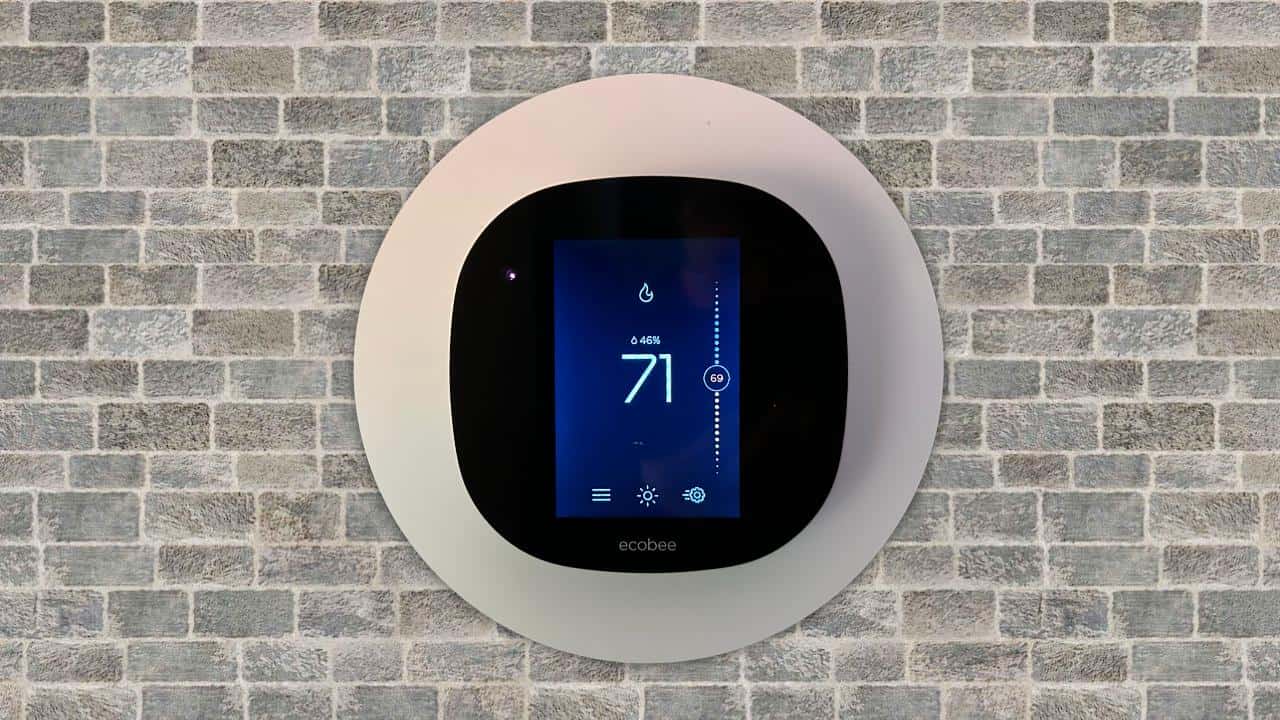
While we were having a sleepover party this weekend, we arranged some furniture in the living room and accidentally blocked the WiFi router. This resulted in a weak signal from the router. This caused Ecobee thermostats to lose the WiFi connection - and turn off the heat. This happened because the router was unable to send a strong enough signal through the furniture, resulting in a weak signal that was not strong enough to maintain the connection with the Ecobee thermostats.
Some sleepover guests complained about being too cold at 2 a.m. We investigated the issue and discovered that the Ecobee was offline. We fixed the issue by connecting the Ecobee to another working hot spot. As soon as it was hooked up, the house started to warm up. The router was offline because it wasn't communicating with the Ecobee, which was the device responsible for controlling the temperature in the house. By connecting the Ecobee to another working hot spot, we were able to ensure that the device was communicating with the hot spot and was able to adjust the temperature in the house accordingly.
There's no explanation for why Ecobee turns off when the WiFi signal is lost. If the WiFi was down when we were on vacation, I couldn't imagine what we would do.
Some Technical Workarounds
First, make sure that your router's firmware is up-to-date. This will ensure that it has all the necessary security features and help prevent any potential connection issues in the future. Furthermore, if possible, try moving your router closer to your Ecobee thermostat. This will improve signal strength and reduce interference from nearby appliances and devices, such as microwaves or cordless phones.
You could also try changing some settings on both sides. On one end, set up a static IP address to improve connectivity; on the other, configure port forwarding rules for specific ports used by ecobee application (443 & 80). You should also check to see if a firewall is blocking access between these devices. Until further troubleshooting steps have been carried out, disable it temporarily. In addition, be sure that each device is connected to the same Wi-Fi network using the same name/password combination - otherwise, they won't recognize each other properly, resulting in eventual disconnections later down the line due to a lack of proper configuration during initial setup.
In conclusion, it's important to remember that regular maintenance of routers and modems should always take place – including the update of software whenever available – because these simple tasks often save us a lot of headaches dealing with various types internet-related issues, including those caused by our beloved Smart Thermostats like Ecobees. In the end, I hope the tips mentioned above helped to resolve the current problem of disconnecting from WiFi and turning it off.
PermalinkPacking Cables
Organize Your Cables for Better Packing
Recently I took an overnight trip and had to bring various cables with me for a video project. I needed to make sure that I had enough cables to charge all my various camera devices.
Electronic Storage Bag
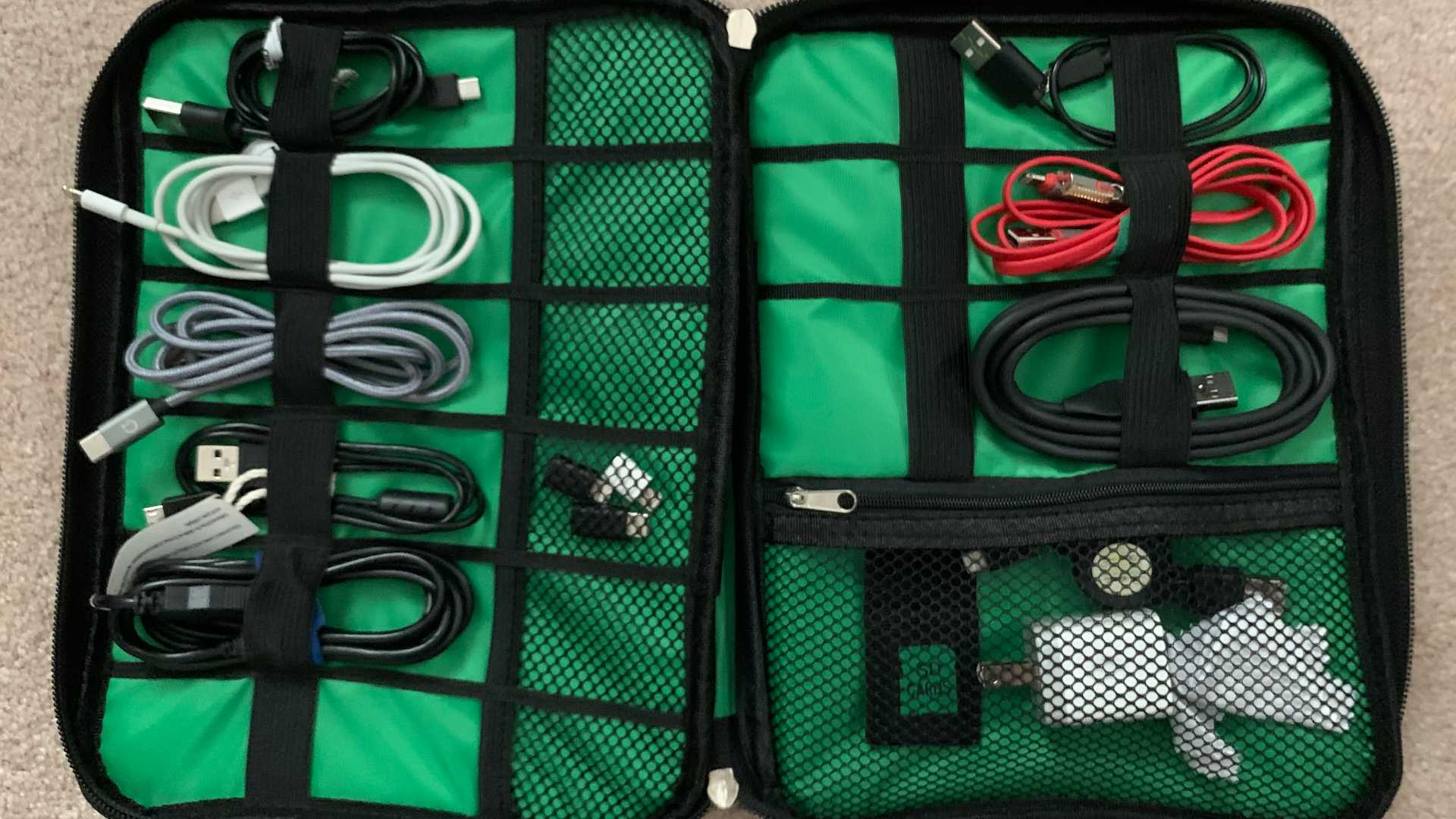
I purchased a small electronic storage bag to help organize my cables. My thought was to get something small so that I wouldn’t overpack and bring a lot of cables that I wouldn’t use
Six Things I Learned
This particular unit has ably 9 cable compartments and it seemed to be the right number of cables that I needed.
When packing, I discovered that I have too many cables that look alike. I thought that it would be a problem when it came time to find a cable, as I would be confused about picking the right one. I ended up selecting different color cables to make my life easier later.
I packed some MicroUSB adapters for lightning cables and USB-C. I didn't end up using these but thought they would be handy to have - just in case I needed them.
I think for future trips it would be better to actually label the cables. That way I know what cable is for what. It would help figure out if I actually have enough cables. I thought I wouldn't need to do that, but looking back it would make it easier to certify that I have a cable for a particular device - instead of thinking I do.
The storage bag has sockets to keep the cables organized. I don't really need twist ties to keep the cable together.
I am considering buying another electronic storage bag just for audio cables. I think it would help find particular cables. The bag comes in black and green. Having two colors will make it easy to find the cable category I need.
Great Investment
A electronic storage bag is very useful to have when traveling with various cable types. It makes it easy to find a particular cable instead of searching for the bottom of the bag.
PermalinkAmazon Deals
You may do better shopping local!
You should know that Amazon doesn’t always have the best deals. They certainly have the beat select but don’t expect them to have the best deals.
You should shop around.
Screwdriver Example
This past weekend I was in a local hardware store buying some motor oil for my lawn motor. As I was browsing around the store, I was checking some of the screwdrivers. I was thinking that I should pick up a Phillips and a slotted screwdriver. You can never have too many screwdrivers.
I saw that they were under $3 each and decided to get them.
When I got home, I pulled out my Amazon app, and scanned the barcode. I was surprised that the exact same screwdriver is selling for $11.90.
Wow!
Amazon Price
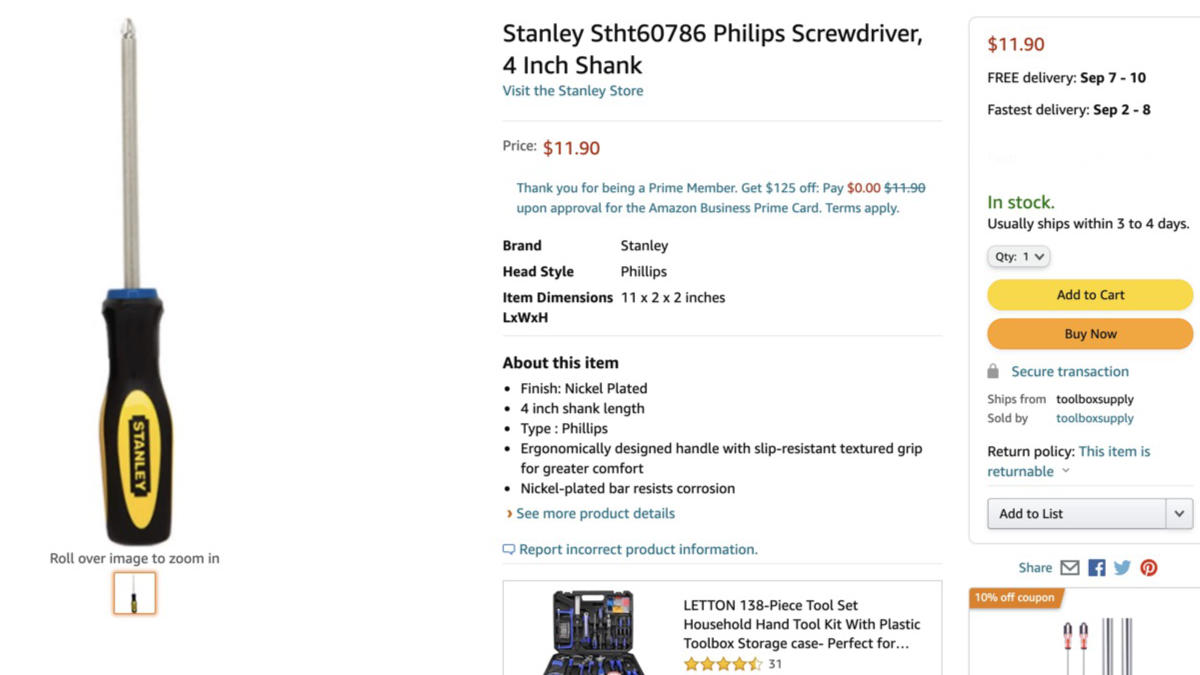
Wow. So Expensive!
Local Store Price
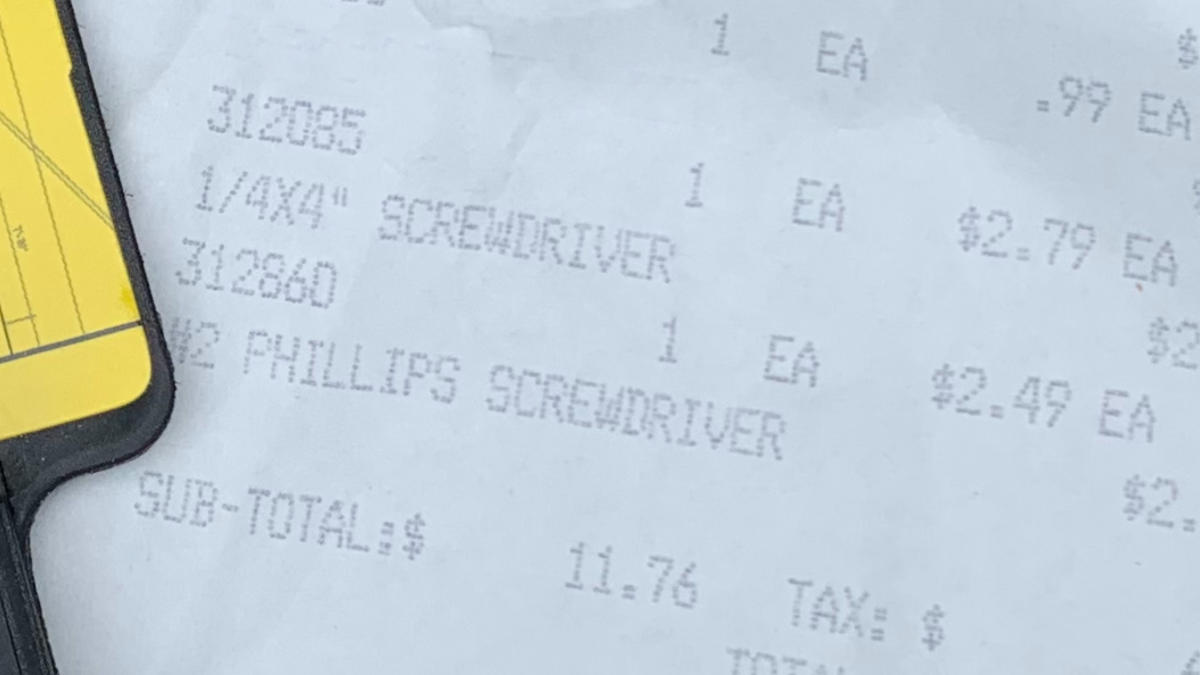
Receipt From Local Store
Other Products Too
I have seen this with other products, such as USB Wall Chargers and Lightning cable. I have seen these at "Five Below" for around $5 each. They go for about $8+ on Amazon.com.
Shop Smart on Amazon.com
No question that Amazon.com is a very convenient place to shop. I would recommend checking local stores for smaller items as they may be cheaper.
Just because Amazon.com offers "free shipping" doesn't mean that you're getting the best deal in town.
PermalinkWonido Indoor TV Antenna
Really cool TV Antenna that is very compact
Last month we realized that we needed a digital HDTV Antenna for our Living Room TV. We recently cut the cord - again - the story behind that is a blog post for another day.
The digital HDTV Antenna that we had in the room was needed in the home office. We wanted something different than a typical flat antenna that would go in a window.
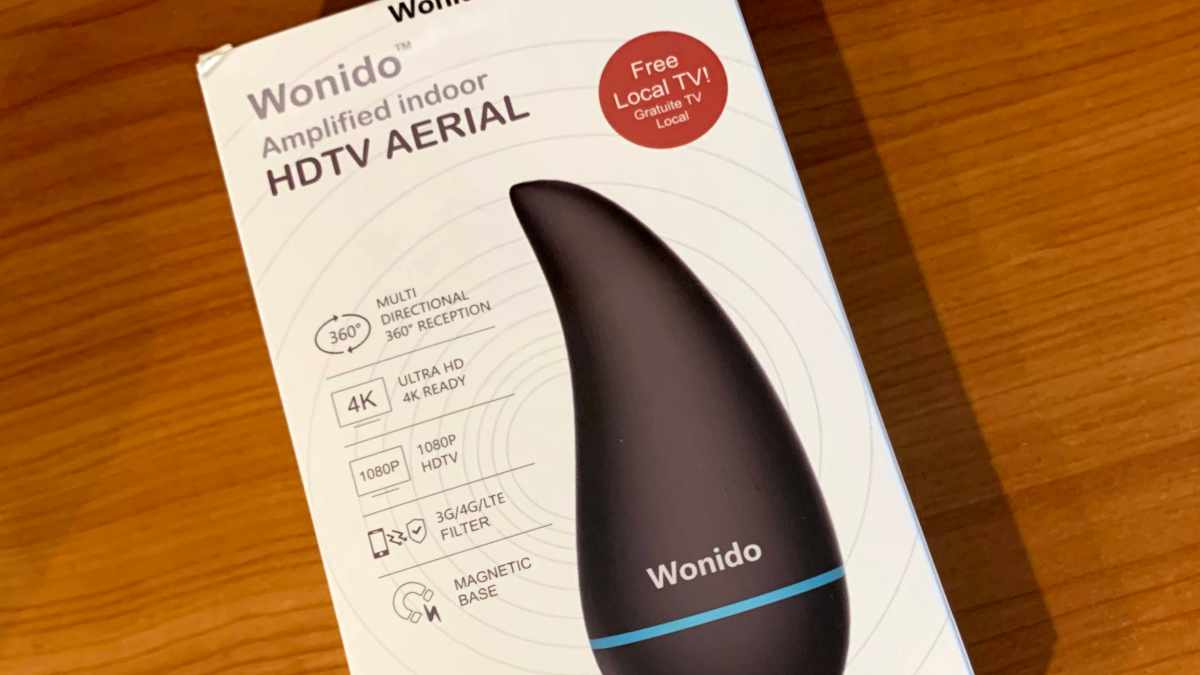
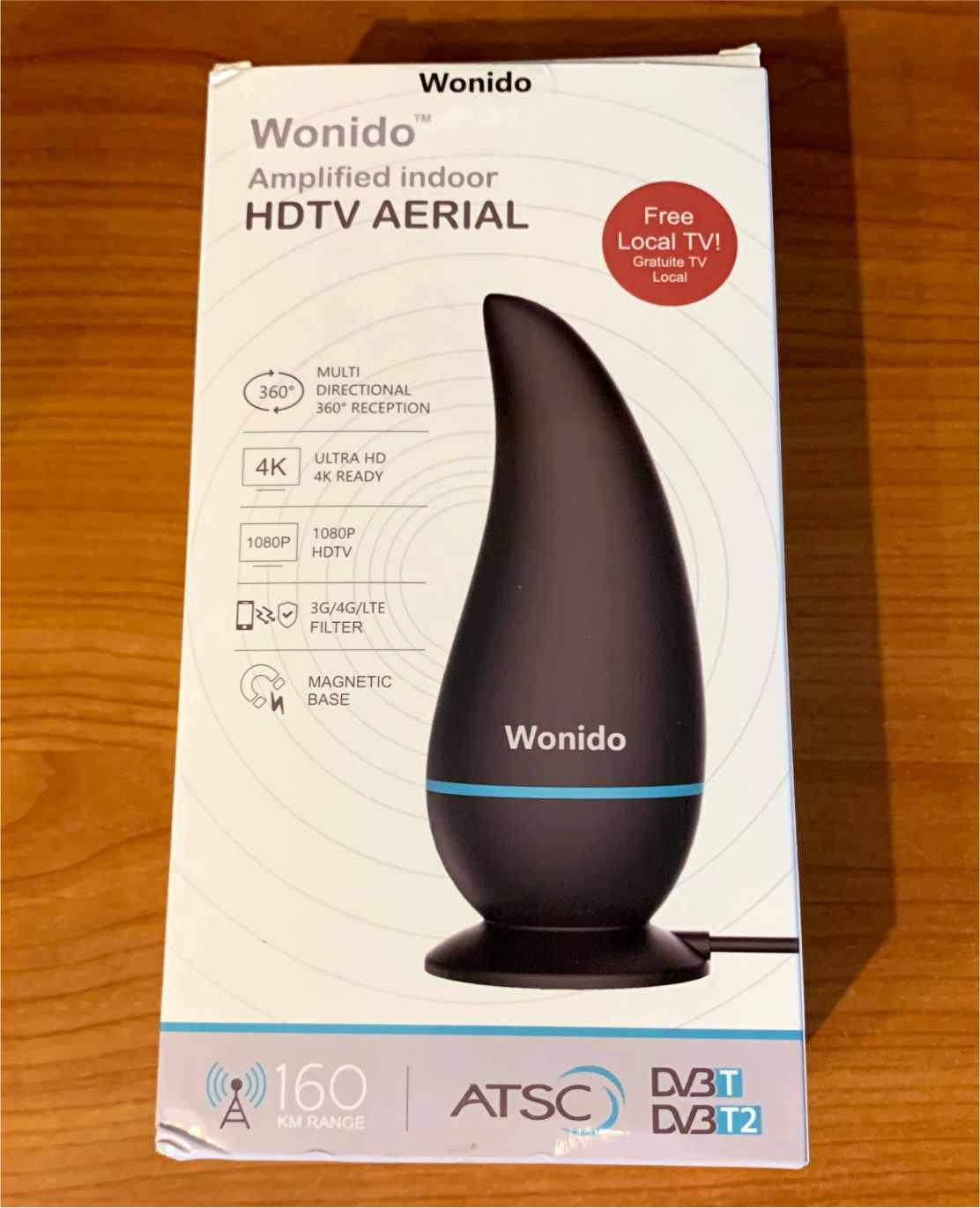
Wonido Antenna
We found the Wonido Digital HDTV Antenna. It seems to be the perfect device. It’s a small antenna that could be put on a shelf and not look bad. It has a range of 150 miles - which is pretty impressive for a small device. (I remember seeing large TV antennas in the attic that didn't have that range.)
Installation was simple. Simply plug in the antenna into the TV and then plug in the USB for power. We plugged the USB into the TV instead of a power jack because it was easier to use the TV.
Once connected we told the TV to scan for available "Over The Air" channels. The Wonido device is currently sitting behind the TV.
We got 44 channels via the DTC air. Which is pretty good because the FTC website says that we should be getting only 20 channels. The weakest signal being 63 miles away.
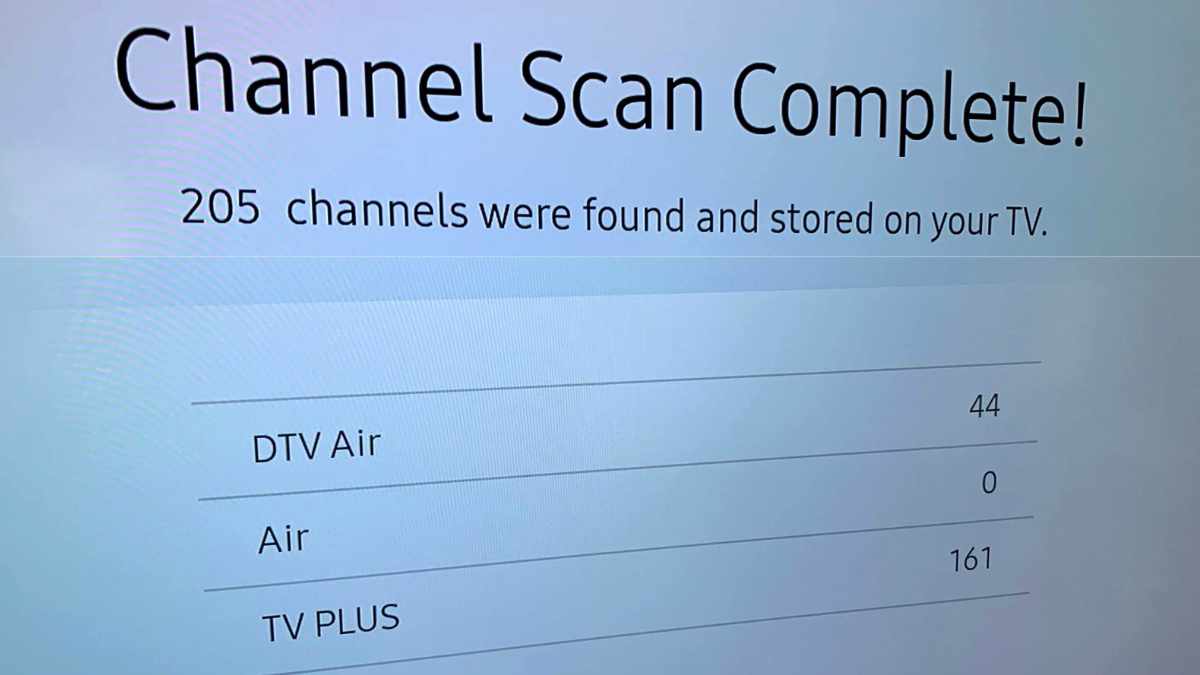
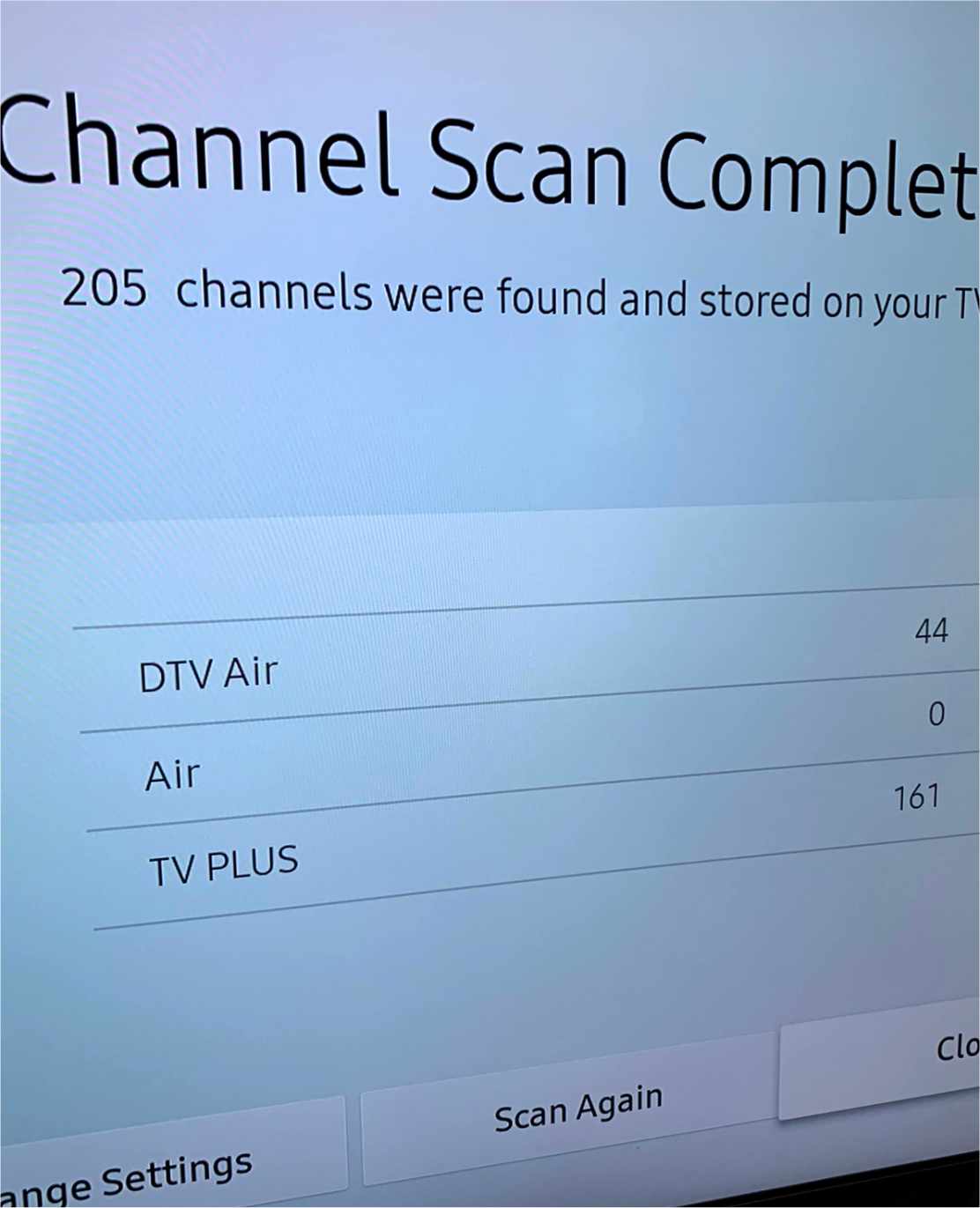
Samsung TV Scan
The above screenshot is from a Samsung TV.
The "Air" category will always be zero since the FCC removed that category in July of 2020. All broadcasts are now over the "DTV Air."
TV Plus is content from Samsung and not something that is from the Wonido Antenna. This is a free ad-supported Smart TV video service. We get instant access to news, sports, entertainment, and more. Samsung provides a list of all the available channels on their website.
Misc Notes
I think if we move the antenna we may get a better signal range. The TV might be blocking the signal strength.
The TV signal is a bit weak on stormy days. We see some delays while watching the news during a snowstorm. It isn’t that bad and maybe moving the device will minimize the distraction.
I noticed during the Super Bowl this year that the audio wasn’t aligned to the video. I noticed this more during the halftime show.
The Wonido Antenna is highly recommend and for $27.99 it is worth the price. You can find the Wonido device on Amazon.com.
PermalinkClip-on Microphone
Cheap Microphone that delivers quality sound.
Sometimes you need a quality microphone for your iPhone. That’s why every iPhone videographer should have a clip-on microphone in their utility bag.
Getting quality audio is critical to any videographer game plan. The clip-on microphone can help get the best possible audio when the standard camera audio just won’t work.
Last month I purchased the Ultimate Lavalier Microphone for Bloggers and Vloggers Lapel Mic Clip-on Omnidirectional Condenser for iPhone on Amazon. This has come in handy several times when filming.
Five Things I Learned
- Super cheap $10 for 2 microphones. No excuse to get one for those just in case moments.
- This microphone has the TRRS audio jack which is supported in every iPhone that Apple has made. It also works on an iMac audio port.
- This means you can use an old iPhone as an alternative audio source for your videos. Have an old iPhone 5s? Why not put it to use?
- Sound quality is good. I tested against various audio clips and found it to be good.
- The nice thing is that you can put the microphone in places where the iPhone may not fit. This gives the videographer the flexibility to record audio from a speaker when the iPhone can’t easily be placed.
Magic Arm with Clamp
Cool tool to have in your camera bag
One of the cool camera accessories that I recently purchased was the Fomito 11 inch Inch Articulating Magic Arm + Super Clamp for Camera, LCD Monitor, LED Video Light. (Otherwise known as a Magic Arm) I have found this to be a really cool camera tool.
A magic arm is basically a tool that has a clamp on one end. and a tripod mounts on the other end.
I have found it serves two useful services:
- It gives you the power to extend your tripod by having having a second camera on the tripod.
- Mount a camera and then angle the camera any way that you want.
Tripod Extension
 Magic Arm on a tripod at Church
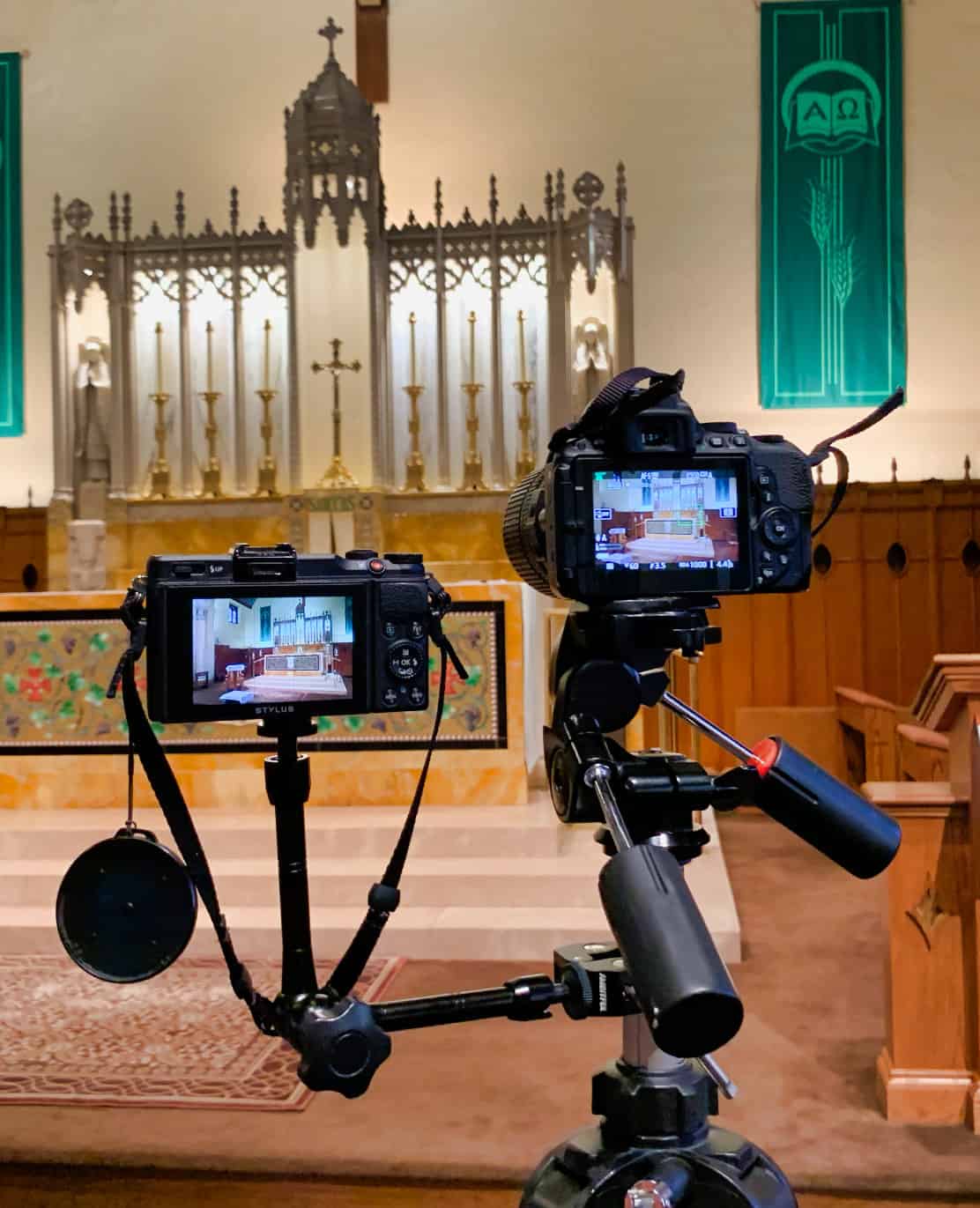 Magic Arm on a tripod at Church
This camera tool allows me to control two cameras on a tripod.
Previously I had two cameras set up to record a church event on two tripods. This was a problem because it involved managing both tripods, it also means that at some point I would have to move two tripods so they wouldn't get in the way. It was also difficult to manage the content between the two tripods.
Now with the Magic Arm, I can better manage two cameras. One camera controls the wide shot and the other controls the close-up shots. Now it happens on one tripod.
Production Tip: Having a second camera is great for filler shots or with audio as some camera handle audio better than others.
Mount Anywhere
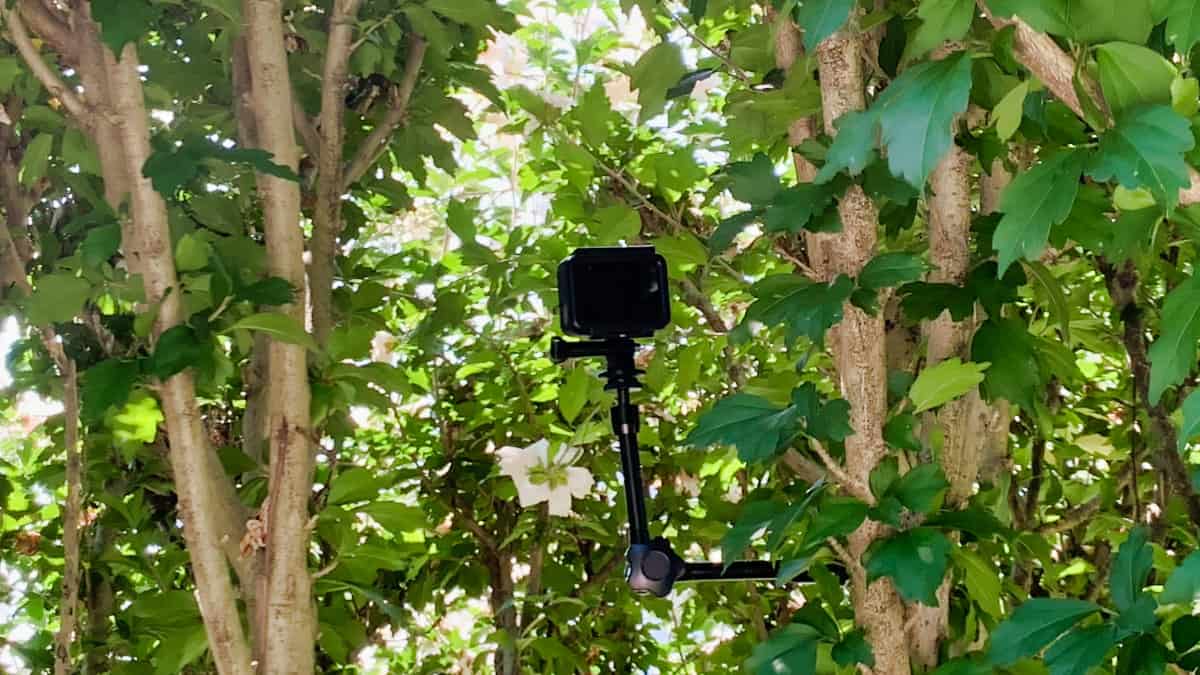 Watching a birds nest with the Magic Arm
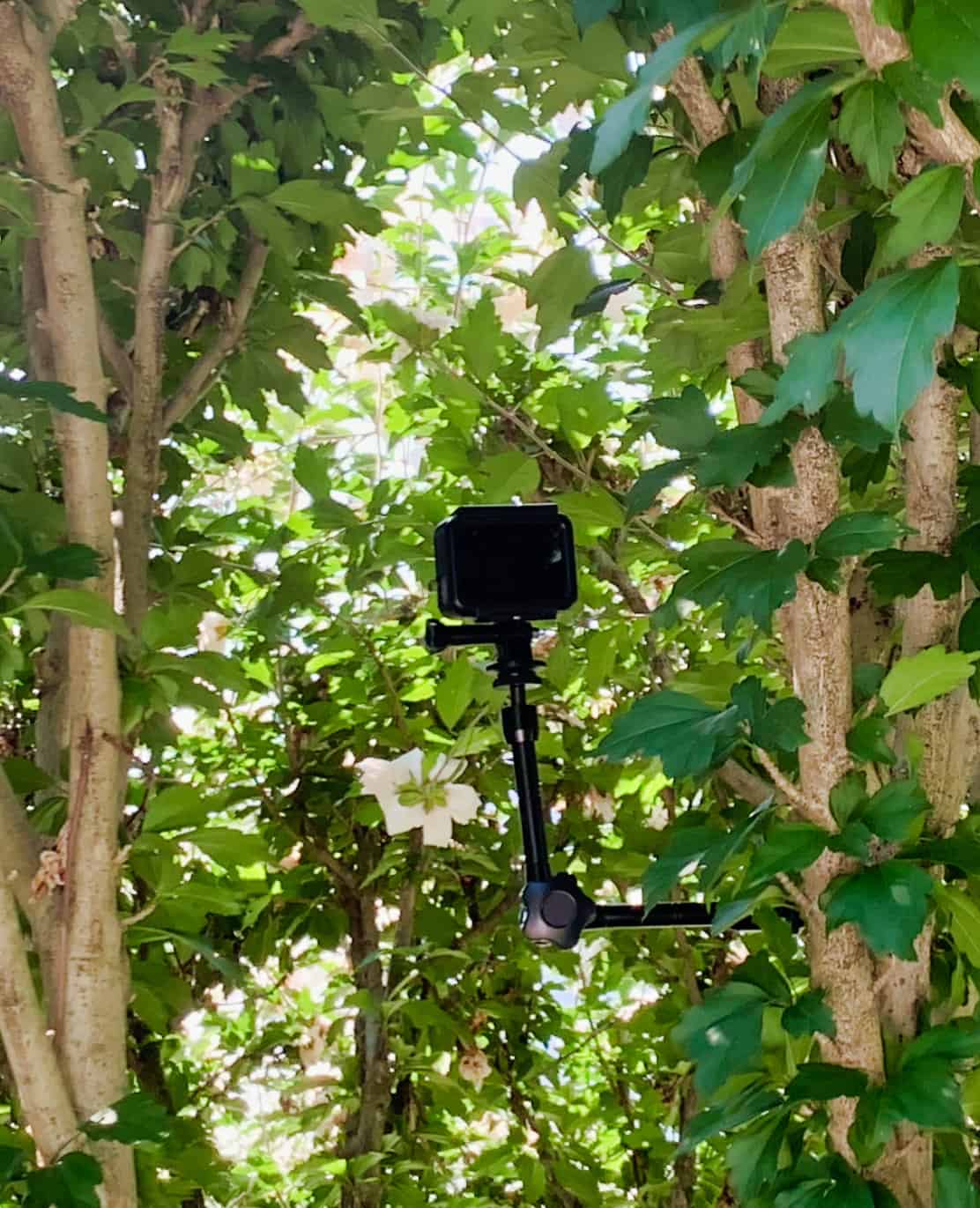 Watching a birds nest with the Magic Arm
The nice thing about the magic arm is that you can mount it anyplace. Even in a tree. The grip is very strong and can hold an iPhone or a GoPro for hours. ( I wouldn’t put a DSLR on it. )
However, the magic arm isn’t safe for wet conditions as I suspect over time it could get rusty or the joint may not work well. If you are doing this for a rainy, damp environment. You'll probably better off with a Joby GorillaPod.
Magic Arm is Great to Have
I highly recommend getting one of these for your photography toolkit. It can come in handy for a variety of reasons.
There are different manufactors for the magic arm, I found the Fomito 11 inch Inch Articulating Magic Arm + Super Clamp for Camera, LCD Monitor, LED Video Light best for my needs. The Pluto Magic Arm with Clamp over at B&H looks good.
You never know when you need to have a second camera mount on a tripod. The magic arm is a great tool to have, just in case you need it.
PermalinkBlog Schedule
| Monday | Media Monday |
| Tuesday | QA |
| Wednesday | Veed |
| Thursday | Business |
| Friday | Macintosh |
| Saturday | Internet Tools |
| Sunday | Open Topic |
Other Posts
- Amazon Pricing
- Joby Grip Tight Gorillapod
- Kindle Word Runner
- Amazon Deals
- Flickr Price Changes
- Flash Drive Deals
- Yankee Shopping Ideas
- Waiting at Limited Supply Sales
- Wrist Information Center.
- Stop and Shop Self Checkout Belt
- Magic Arm with Clamp
- CE Marks
- Black Friday Shopping Tips
- Shopping Ideas for iPhone 6s Plus Users
- Monopod as a Tripod